Home > Tutorial > Google Reader in Facebook

Google Reader in Facebook

March 30th, 2009 Leave a comment Go to comments

This has been around for a while, but I only recently started using it. Facebook’s built-in importer application can automatically add your Google Reader shared items to your mini feed.

To configure this, open your Profile to display all items you have posted.

Select your Profile at the top of the Facebook website

Select your Profile at the top of the Facebook website

On the profile page:

  1. Click “Settings” on the bottom right side of the Write Something box
  2. Choose “Google Reader” as the site to import from
  3. Enter the URL to your public “Shared items” page from Google Reader and press import

That’s all it takes. Now, when you share an article in Google Reader a post will be made in your mini feed on Facebook with a link to the article.
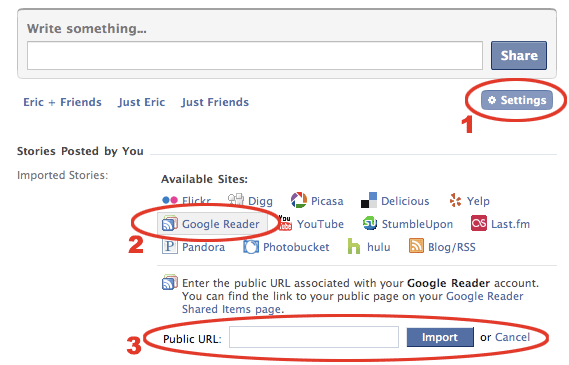
Steps to add Google Reader

Steps to add Google Reader

Share

Related posts:

  1. Using Google Reader to stay on top of RSS feeds

  1. moi
    May 11th, 2010 at 18:14 | #1

    this updates my status on FB to say i shared not what i shared… user have to click the link to see items i have shared!! guessing FB have changed the way it feeds the updates?

    • May 13th, 2010 at 02:02 | #2

      Yeah, they did change it. It used to say the title of the article for each article shared.

  1. No trackbacks yet.

You appear to have javascript disabled. If you'd like to leave a comment, please enable javascript for this site and for intensedebate.com