Archive

Archive for the ‘Uncategorized’ Category

Front-end HTPC hardware: No perfect solutions

I’ve been searching for a while for a perfect front-end for my home automation and entertainment system.  In my setup, the front-end system needs to do the following

  1. display media on the tv over HDMI
  2. send digital audio to the receiver
  3. accept input from a remote control
  4. handle HD content streamed over the network
  5. run quietly and use little power

The front-end doesn’t need to have any storage, TV tuners, or DVD/Blu-ray drives.  That is all handled elsewhere in my setup.  My perfect front-end system would have these features

At least four USB ports
I have two RF remotes and one Bluetooth adapter plugged into each of my front-ends.  My primary RF remote is a media-center type remote – with a numeric keypad and play/pause style controls.  My secondary remote has a QUERTY keyboard and a touch pad mouse – used when surfing the web.  I also have a USB Bluetooth adapter.  I’d like to have at least four USB ports to support these devices and anything else I need to add in the future.

Suspend to RAM with USB wake-up
On average, I probably only watch about an hour of TV a day.  That means twenty-three hours of the day the front-end system is sitting idle.  I’d like to be able to put the computer into a low power mode (S3 – suspend to RAM) when it is not being used.  I’d also like to be able to wake-up the computer with a remote control rather than needing to push the power button.  In my setup, I have an RF remote control with a USB dongle plugged into the front-end.  I need the USB port to stay active when the computer is suspended so that it can wake-up when a button is pressed on the remote.

NVIDIA GPU powerful enough to de-interlace at 1080p
My home automation and entertainment system is running Linux.  Today, the only graphics card vendor to fully support hardware acceleration under Linux is NVIDIA (see VDPAU).  Not all NVIDIA GPUs are created equal and I want one that supports de-interlacing at 1080p resolutions.

HDMI and digital audio out
My TVs have HDMI connections for video, but I don’t necessarily want the audio to go to the television.  Rather, I’d like the audio to go to my receiver.  The front-end system needs to have both an HDMI port and a digital audio out port.  I’d prefer a coax audio out over a fiber-optic audio out because I don’t have to worry about pinching and breaking a coax cable.

Network booting and Wake-on-LAN
I don’t want to have hard drives on my front-end systems.  I’m not doing any recording on these systems and a hard drive contributes to power use – and it needs to be backed up.  The network card in the front-end needs to support PXE booting.  This way I can store the OS on the back-end and easily update it and keep proper backups.  I’d also like the network card to support wake-on-lan (WoL).  If I ever upgrade the software, or lose power, I need my back-end server to start first, then send the wake-on-lan packet to each of the front-end computers.

Gigabit Ethernet
I’m streaming HD content from the front-end and also booting over the network. I don’t want to slow down my wireless network with this traffic or have wireless interference disrupt my media.  I’d like to have a Gigabit Ethernet card in the front-end.

At least 4GB of RAM
I’m not putting a hard disk into my front-end system.  There will be no swap space and everything will need to be stored in RAM.  I’d like to have at least 4GB of RAM in a front-end system.

Bluetooth
I have Bluetooth USB dongles already, but it would be nice to have Bluetooth integrated right on the computer to I don’t have to have yet another USB dongle sticking out of the comptuer.

Serial port(s)
Yes, serial ports are old technology, but my television and receiver can be controlled over a serial interface.  In my experience, this is much more reliable than IR.  I’d like the front-end to have at least one serial port.  Two would be preferred.

IR Output
Several HTPCs come with an IR input and a media center remote.  I’d rather use RF for input so the PC can be out of sight. IR output is what I’d really like to see on an HTPC.  This is needed to control DVD players/gaming consoles and every other device that cannot be controlled via ethernet or serial.


I haven’t been able to find any retail HTPC computers that have everything I’d like in a front-end system. The NVIDIA Next Generation ION (aka ION2)based computers from Asus and Zotac come close, but most lack bluetooth, serial ports, and IR Outputs. It is also hard to tell which motherboards support network booting and wake on USB/LAN.  Hopefully the next generation of HTPC systems will have more of what I’d like. For now I’ll stick with the Zotac ZBOX HD-ID11 and add a bluetooth dongle and the GC-100 for serial and IR.

Share
Categories: Uncategorized Tags:

One Server: Researching the hardware

Using my list of requirements, I set out to find the hardware for my new server.  I was building this from scratch so at minimum my purchase list needed to include

  1. hard drive storage
  2. server case
  3. motherboard, RAM & CPU

Hard drive storage
I decided to focus first on the requirements for the fileserver side of the project.  Recall that I was planning for 16TB of storage space.  At the time, the largest consumer hard drives were 2 TB.  I also wanted to be able to support multiple drive failures and be able to replace the drives without shutting down the system.  That meant I needed at least 10 hard drives.

When researching the hardware for this server I came across a good blog post from Adaptec about real life RAID reliability.  That article compared the reliability of  RAID-5 and RAID-6 arrays and showed that a RAID-6 array should last 172 times longer than a RAID-5 array.  Reliability was important to me on this project, so I decided to go with RAID-6.  The Adaptec article only considered enterprise grade drives. I planned to build this server with consumer grade drives.  Therefore, as a precaution, I chose to add two extra drives as hot spares.

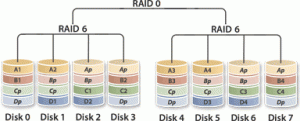
A RAID-6 array with 10 drives was likely to run slow.  So I did some more searching and came across RAID-60.  RAID-60 combines the redundancy of RAID-6 with the speed of striping found in RAID-0.  However, to get 16 TB with RAID-60, and have two hot spares, I now needed 14 hard drives.  Six drives for each of the two RAID-6 arrays and two hot spares.

RAID-60 with 8 drives. Image from Wikipedia

I wanted to make sure the fileserver would run quickly so that I could stream video from it while MythTV was also recording new programs and all the virtual machines were also running.  I thought running everything off one set of storage drives might be too much, so I decided to split the VM storage from the NAS storage.  That meant adding additional drives.  I had four 1TB drives from my previous NAS, so I decided to use them for storing the VM images.

That put the total number of hard drives needed at 18.  This was shaping up to be quite a storage server!  The next task was determining how to fit that many hard drives into a computer case.

Server Case
I wanted the server to be able to stay running while I replaced a failed drive, so I needed a case that accommodated hot swappable drive bays.  I considered putting the drives into some six-bay external drive enclosures, but decided that would get too expensive and end up using more power then was needed.  Plus, I could just see the cables getting disconnected between the external enclosures and the main CPU.

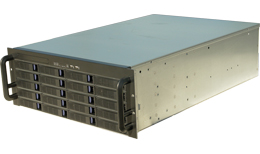
No tower-style case that I could find would hold that many drives, so I looked for rack mountable cases.   To fit 18 drives, a 4U rack mount case was needed.

Motherboard, RAM & CPU
I wanted to be able to expand this system in the future, so when choosing the motherboard I focused on server boards that supported dual CPUs.  My plan was to put the system together with one CPU, and if needed, add another CPU later.  I also needed to find a motherboard with multiple network interfaces, and plenty of PCI-express slots for adding RAID cards.  Since reliability was important to me, I focused only on motherboards that supported ECC RAM.  Form factor wasn’t a big issue for this system as it was being placed into a rack mount case with plenty of space.

For the CPU, I needed a processor that supported VT-d.  VT-d processors support mapping cards plugged into PCIe slots directly into virtual machines.  My goal was to create a virtual machine for the fileserver and map the RAID card directly into that VM.

Another goal of mine was to make the new server easy to administer.  I didn’t want to have to find a spare keyboard, mouse, and monitor and plug them all in when there was trouble.  The solution, IPMI.  A motherboard with IPMI would allow me to remotely control the keyboard, mouse, video and even attach a remote DVD-ROM to perform an OS install.  It is basically a built-in KVM over IP.  I can even remotely reset the computer using IPMI.

Parts list
I ended up purchasing the following components for this system

  • 14 x 2 TB hard drives (5 x Hitachi HDS72202, 3 x SAMSUNG HD203WI, 6 x WDC WD20EADS)
  • Norco RPC-4220 4U rackmount case with 20 hot swappable drive bays
  • Supermicro X8DTi-F motherboard with 3 PCIe 8x slots and IPMI
  • 24Gb ECC Registered DDR3 1066 RAM
  • Intel Xeon E5506 Nehalem-EP 2.14 GHz processor
Share
Categories: Uncategorized Tags:

A home server using VMware ESX and ZFS

Server CaseIf you are like me, and you like technology, you probably find yourself wanting to try the latest operating systems and software.  You also likely have a router for your network, a NAS device for your storage, and maybe a web server for a blog or wiki.  After a while, you end up with the situation shown in the picture below, a closet full of servers.
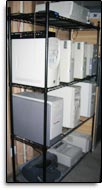
The picture below is of my server closet from 2004.  I had a custom Linux router, a NAS box, a VoIP server, and several other computers for trying out operating systems and software.

Old Server ClosetMy setup continued that way for several years.  It took up a lot of space.  It was loud.  It was hard to upgrade because I needed to physically sit at the computer to reload the operating system.  And it used a lot of power.

In 2007 I started to use virtualization to cut down the number of computers and make controlling and upgrading them easier.  I was able to get the number of computers down to only two: A NAS for storage, and a Linux computer for running VirtualBox.  Everything else I needed could run in a VirtualBox guest.

This worked well until 2009 when I started to run out of storage on my 3 terabyte NAS server.  As I was planning to replace it, I decided to try combining the two servers into one.  I wanted a server that would have plenty of disk space for my NAS and be able to run any operating system and software that I wanted to try out.

I called this my One Server project.  The next several posts will cover this project.  These posts describe the hardware behind the server, using VMware ESXi to replace my aging Linux VirtualBox server, setting up a FreeBSD ZFS NAS fileserver under VMware ESXi, and all the issues and solutions I discovered along the way.

  1. One Server: What is needed?
  2. One Server: Researching the hardware
Share
Categories: Uncategorized Tags:

One Server: What is needed?

To make sure I got the right hardware and software for this server I needed to know what the server was going to be used for.  I needed to get an idea of how much computing power I was going to use to run all the virtual machines.  And since this project started off as an upgrade to my NAS fileserver I also needed to figure out how much storage space I was going to need.

I knew from my previous VirtualBox server what guest operating systems I was going to run.  They were:

  • Astaro Security Gateway for the firewall/router
  • Windows 7 for a “standalone” computer used only for banking
  • Linux for a web server
  • Linux for a CrashPlan backup server
  • Linux for a OpenVPN server

My previous fileserver had four disks in a RAID-5 setup for a total of three terabytes.  It was very slow and I wanted to find a way to speed it up.  At the same time I needed to add enough disk space so that I wouldn’t have to think about disk space for a long time.  I previously used the file server for:

  • storing backup copies of my iTunes music and video libraries
  • keeping copies of operating system ISO install images for installing VMs
  • backing up my wife’s and my own laptop as well as my web server
  • storing an ever growing 500Gb RAW photos library from my DSLR camera
  • storing video for my MythTV setup

I had also recently gotten a new camera capable of recording HD video.  HD video files take up a lot of space and with a new baby daughter I was recording a lot of video.

Doing the math, I decided I needed at least 8 terabytes of storage to comfortably cover my needs.  To make sure I wouldn’t have to worry about storage space again, and considering Moore’s law, I decided to double that and plan for 16 TB of storage space.

I had the following additional requirements of the server itself

  1. be reliable enough to run 24×7 for several years
  2. continue working without data loss if two hard drives fail
  3. allow for hard drives to be replaced without shutting down the system
  4. be easy to backup
  5. report any errors with the drives or the virtual machines so they can be fixed quickly
  6. be compatible with as many guest operating systems as possible
  7. be easy to install, maintain, and configure.  Well, easy for a technical person at least
  8. allow for remote maintenance of the host operating system
  9. have room for expansion (cpu/ram/disk/etc upgrades)
  10. be quiet
  11. not use too much electricity
  12. support multiple network interfaces. It is going to be my router and needs to plug into my cable/dsl modem as well as my LAN

The reliability of the server was my most important factor.  Since I was consolidating everything on this one server, if it ever went down nothing would work.  It was also going to store all our family photos and videos.  I planned to keep everything backed up, but I wanted to make sure I wasn’t going to lose those memories due to a failed disk or silent bit rot.

Share
Categories: Uncategorized Tags: